









怎么将一个列表中的元素移动到另外一个列表中
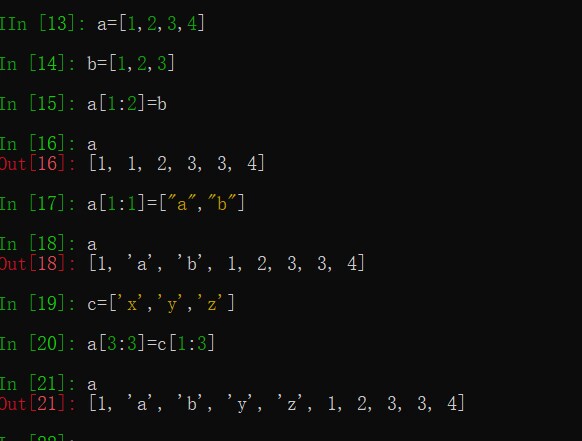
你这样问问题不知道问的啥,有点难回答,试试列表切片?
![]}WA0%]C1OIWR$3K)UZTCM4.png](https://img.zdaye.com//image/20230926/16957161787719480.png "]}WA0%]C1OIWR$3K)UZTCM4.png")
b = a.copy()
label_pic_list = []
path =  D:\Python实操\抽奖系统\photos
i = 0
y1 = 360
x1 = 300
y2 = 120
x2 = 1200
for photo in photos:
    if i == 0:
        photos_images[i] = ImageTk.PhotoImage(Image.open(photos[i]).resize((160, 160)))
        label_pic = Label(root, image=photos_images[i])
        label_pic.place(x=600,y=120,width=160,heigh=160)
    elif i == 1:
        photos_images[i] = ImageTk.PhotoImage(Image.open(photos[i]).resize((120, 120)))
        label_pic= Label(root, image=photos_images[i])
        label_pic.place(x=550, y=300, width=120, heigh=120)
    elif i == 2:
        photos_images[i] = ImageTk.PhotoImage(Image.open(photos[i]).resize((120, 120)))
        label_pic= Label(root, image=photos_images[i])
        label_pic.place(x=700, y=300, width=120, heigh=120)
    elif i   34 and i   2:
        photos_images[i] = ImageTk.PhotoImage(Image.open(photos[i]).resize((100, 100)))
        label_pic= Label(root, image=photos_images[i])
        x1 = 300 + 100 * i + 10
        if (i - 3) % 8 == 0:
           y1 = y1 +  100 + 10
           x1 = 300-90
        else:
           x1 = 300 + 100 * (i % 8) + 10
        label_pic.place(x=x1, y=y1, width=100, heigh=100)
    else:
        photos_images[i] = ImageTk.PhotoImage(Image.open(photos[i]).resize((60, 60)))
        label_pic = Label(root, image=photos_images[i])
        if (i - 35) % 8 == 0:
            y2 = y2 + 50 + 70
            x2 = 1200-55
        else:
            x2 = 1200 + 60 * (i%8) + 1
        label_pic.place(x=x2, y=y2, width=60, heigh=60)
    #print(label_pic1)
    #label_pic_list.append(label_pic1)
i = i + 1就是将i==0这个索引的图片存到另一个列表中,避免其在次被选中
就是删除索引为0的图片?
是的
这样直接del photos[0]即可
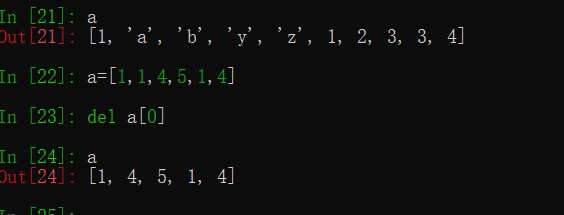
试过了
没用
第二次运行的时候还是会将图片显示出来
我也不知道为啥


快速咨询热线:
024-31823261


国家高新技术企业证书编号:GR202321001563

增值电信经营许可证: 辽B2-20180026
互联网虚拟专用网业务许可证:B1-20181940

公司地址:沈阳市浑南区上深沟村沈阳国际软件园F7座


